
Parameterised Views
The AddressBook example can be changed to allow editing of existing Addresses.
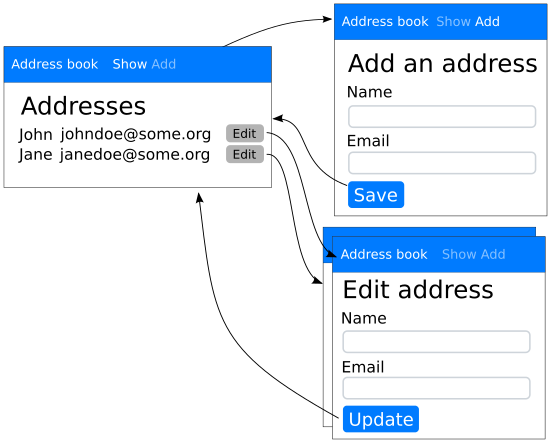
Views for editing addresses.
A View can have arguments—so that a single “Edit” View is
defined for an as yet unknown Address. Computing the actual
contents of the View is delayed until the Address argument becomes
available.
How to create a parameterised view
To specify that a View has arguments, create your own class that
inherits from UrlBoundView. Give it an
assemble() method with keyword
arguments that represent the arguments to the
UrlBoundView.
Customise the View based on the arguments given inside this
assemble() method. The title of the
UrlBoundView is set by setting
title. Populate the Slots by
calling set_slot()
class EditView(UrlBoundView):
    def assemble(self, address_id=None):
        try:
            address = Session.query(Address).filter_by(id=address_id).one()
        except NoResultFound:
            raise CannotCreate()

        self.title = 'Edit %s' % address.name
        self.set_slot('main', EditAddressForm.factory(address))
If an EditView is requested for an address_id that does not exist, raise
a CannotCreate to indicate that the
EditView does not exist for the given arguments.
How to define a parameterised view
To define a parameterised View, use the view_class keyword
argument to define_view().
The framework parses arguments from the URL of the UrlBoundView and
passes these into the call to assemble().
Fields describe how the framework manages arguments sent to the
View via its URL. Each Field sent as a keyword argument to
define_view() is used to compute the value of a matching keyword
argument in assemble().
class AddressBookUI(UserInterface):
    def assemble(self):
        home = self.define_view('/', title='Show')
        add = self.define_view('/add', title='Add')
        edit = self.define_view('/edit', view_class=EditView, address_id=IntegerField())

        home.set_slot('main', AddressBookPanel.factory(self))
        add.set_slot('main', AddressForm.factory())

        bookmarks = [f.as_bookmark(self) for f in [home, add]]
        self.define_page(AddressBookPage, bookmarks)

        self.define_transition(Address.events.save, add, home)
        self.define_transition(Address.events.update, edit, home)

        self.edit = edit

    def get_edit_bookmark(self, address, description=None):
        return self.edit.as_bookmark(self, address_id=address.id, description=description)
Bookmarks to parameterised Views
In any Reahl application there are two ways to get to a UrlBoundView:
the application automatically switches to the
UrlBoundViewbecause of a transition.
Our ‘tutorial.parameterised1’ example creates an A next to each
listed address:
class AddressBox(Widget):
    def __init__(self, view, address, address_book_ui):
        super().__init__(view)
        bookmark = address_book_ui.get_edit_bookmark(address=address, description='edit')
        paragraph = self.add_child(P(view, text='%s: %s ' % (address.name, address.email_address)))
        paragraph.add_child(A.from_bookmark(view, bookmark))
A distinct Bookmark is computed for each Address. This is done in
AddressbookUI.get_edit_bookmark:
    def get_edit_bookmark(self, address, description=None):
        return self.edit.as_bookmark(self, address_id=address.id, description=description)
Transitions to parameterised Views
The ‘tutorial.parameterised2’ example shows how you would
automatically transition a user to a parameterised view. The example
has an edit Button instead of a link placed next to each
Address. First, define a transition that will fire when the “edit”
Button gets clicked:
class AddressBookUI(UserInterface):
    def assemble(self):
        home = self.define_view('/', title='Show')
        add = self.define_view('/add', title='Add')
        edit = self.define_view('/edit', view_class=EditView, address_id=IntegerField())

        home.set_slot('main', AddressBookPanel.factory())
        add.set_slot('main', AddressForm.factory())

        bookmarks = [f.as_bookmark(self) for f in [home, add]]
        self.define_page(AddressBookPage, bookmarks)

        self.define_transition(Address.events.save, add, home)
        self.define_transition(Address.events.update, edit, home)
        self.define_transition(Address.events.edit, home, edit)
A Button has to be in a Form, so AddressBox must change to be a
Form. Call
with_arguments() on the
Event to which the Button is tied so that the user will transition
to an EditView matching that specific Address.
class AddressBox(Form):
    def __init__(self, view, address):
        form_name = 'address_%s' % address.id  # Forms need unique names!
        super().__init__(view, form_name)
        paragraph = self.add_child(P(view, text='%s: %s ' % (address.name, address.email_address)))
        paragraph.add_child(Button(self, address.events.edit.with_arguments(address_id=address.id)))