
User interaction
Forms and Inputs
Forms get input from users. Build up the Form by adding Input
Widgets to it (or one of its children), via an appropriate FormLayout.
To group some TextInputs visually, add them to FieldSet via a
FormLayout. The FormLayout arranges the TextInputs with their
associated labels and validation error messages. Call
add_child() to add the FieldSet to the
Form.
class AddressForm(Form):
    def __init__(self, view):
        super().__init__(view, 'address_form')

        inputs = self.add_child(FieldSet(view, legend_text='Add an address'))
        inputs.use_layout(FormLayout())

        new_address = Address()
        inputs.layout.add_input(TextInput(self, new_address.fields.name))
        inputs.layout.add_input(TextInput(self, new_address.fields.email_address))
Fields provide metadata
Each Input is wired to an associated Field. A Field
holds more information about the similarly named attribute of the
Address. EmailField constrains the input to be a valid email
address. Invalid input is blocked by the EmailField and the
FormLayout displays an error message underneath its TextInput.
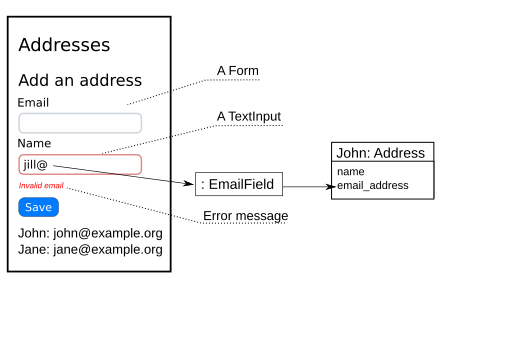
A rough design sketch
Fields are defined on Address using a method decorated with
exposed:
class Address(Base):
    __tablename__ = 'addressbook2_address'

    id            = Column(Integer, primary_key=True)
    email_address = Column(UnicodeText)
    name          = Column(UnicodeText)

    @exposed
    def fields(self, fields):
        fields.name = Field(label='Name', required=True)
        fields.email_address = EmailField(label='Email', required=True)
Note
Don’t confuse Fields with SQLAlchemy’s Columns.
The email_address Field sets the email_address attribute of an
Address when a Form is submitted (and after validating the
input). A Column on that same email_address takes another
step—to persist the attribute to the database. They are
independent and do not have to be used together.