
Security and access control
Multi user address book
The example in this section is a multi-user address book application. Each user has his or her own address book. Users can also grant other users (called collaborators) the rights to see, change or add to the address books of one another.
Here’s how you can navigate the application:
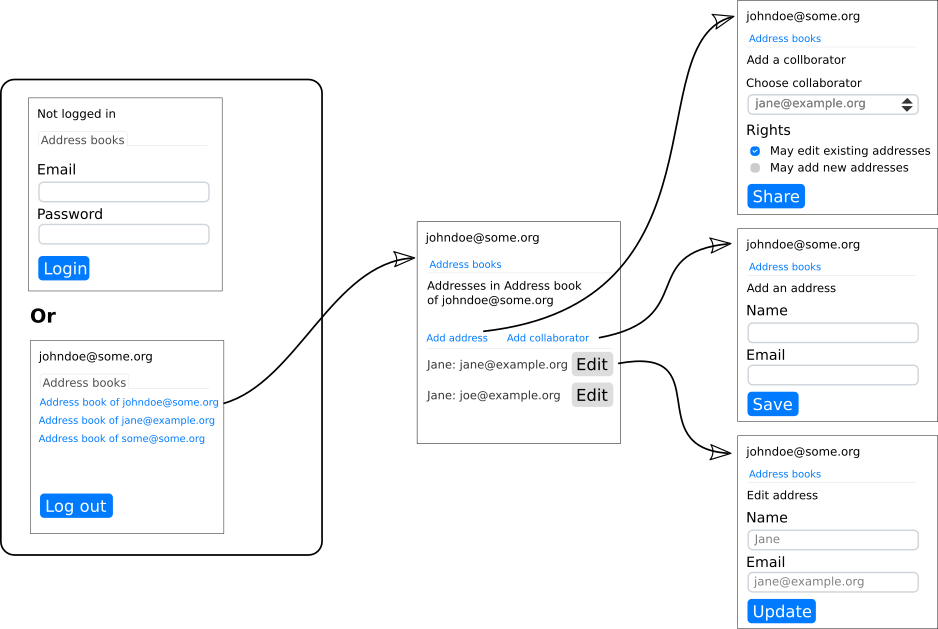
A schematic plan of the user interface
Access control rules
By default, no-one can see another’s address book.
Only the owner of an address book can add others as collaborators to her own address book or change their collaborating rights.
If user A adds user B as collaborator (with NO rights), user B can see the address book of A but cannot change anything.
If user A gives collaborator B “can modify” rights, B can only edit the existing email addresses in A’s address book, but cannot edit the names those addresses belong to.
If user A gives collaborator B “can add” rights, B can add addresses to A’s address book and modify any field of existing addresses.
User interface requirements
In order to ensure these rules are adhered to, there are lots of things to look out for on the user interface:
Where addresses are edited or added, you need to make sure that its “email_address” and “name”
Fields are editable or grayed out or not shown at all, depending on the rules.The “Edit” button next to each email address must be grayed out unless the user is allowed to edit that Address.
The “Add collaborator” and “Add address” menu items must be grayed out if the user is not allowed to perform the specific function on the current address book.
If a malicious user figures out what URL to type in order to visit a
UrlBoundViewfor something she is not allowed to visit (ie, someone else’s address book), that page should not be displayed.
Protect the fields on Address
Pass an Action (which returns a boolean) as a readable or writable
keyword argument to the Fields assigned in Address.fields in order
to control the access granted by any Input that displays that
Field.
If a
Fieldis readable, but not writable, anInputusing it will be present, but greyed out.If the
Fieldis both readable and writable, theInputwill be displayed and active.If the
Fieldis not readable and also not writable, the correspondingInputwill not be displayed on the page at all.It is also possible for some
Fields to be writable, but yet not readable (as used for passwords—that may be written but not read). In this case, anInputwould be displayed and be active, but it will always be rendered without any contents.
Here it is in the code of Address:
    @exposed
    def fields(self, fields):
        fields.name = Field(label='Name', required=self.can_be_added(), writable=Action(self.can_be_added))
        fields.email_address = EmailField(label='Email', required=True, writable=Action(self.can_be_edited))
The name Field is required, but that only applies when it is writable.
The methods used by the Actions:
    def can_be_added(self):
        current_account = LoginSession.for_current_session().account
        return self.address_book.can_be_added_to_by(current_account)
    def can_be_edited(self):
        current_account = LoginSession.for_current_session().account
        return self.address_book.can_be_edited_by(current_account)
Protect URLs from malicious users
What if a malicious user discover what the URL is for an addresses she is not allowed to see?
Since EditAddressView is already aware of access rights (as per the previous section), visiting that URL will result in an HTTP 403 error if the user does not qualify to see it.
Out of sight
Reahl safeguards against many potential ways that malicious attackers could try to bypass your restrictions.
A malicious user could edit the HTML in the browser to enable inputs that were originally disabled. However, the same access control rules that generate that HTML is again checked server side when input is received to ensure this cannot happen.
A malicious user can also snoop on network traffic to the browser and
see sensitive information, such as a password. To guard against this,
a Widget can be made “security sensitive”. If any security sensitive
Widget is detected on an UrlBoundView, that UrlBoundView is
automatically served via HTTPs.
Any Widget that has a non-default read_check is deemed security
sensitive. Alternatively, call
set_as_security_sensitive() explicitly.
In the case of Input
Widgets, the same inference is made from the
access rights of the Field to
which it is linked.